
The Fiction item type is an interactive fiction activity aka "choose your own adventure." Old school computer users might remember games like "Zork" or "The Count" where the user's choices determine the direction the story takes. You can play MiniLesson Fiction item examples here :
https://demo.poodll.com/mod/minilesson/view.php?id=1867
and here:
https://demo.poodll.com/mod/minilesson/view.php?id=1869
This is a video introduction to it: https://youtu.be/sw9d5P7Tigw
Configuration
The configuration settings for the fiction item are:
| Fiction Yarn | This is the story itself. It is written in Yarn format (version 2.0) which is described in detail below. |
| Attachments | Pictures, video or audio which should be displayed within the story are added here. The filename of the attachment is used in the Fiction yarn as described below to load and show it. |
| Presentation | The style of the Fiction player, currently either plain, storymode or mobile chat. |
| Flowthrough Mode | If 'yes' sequential messages from the story will come through without the user pressing 'continue', until it is the user's turn to choose an option. |
| Show Non-Options | If 'yes' options in the story that are not available (yet) to the user will be shown as disabled buttons. If 'no' they will be hidden completely. |
Autogenerating Fiction Items
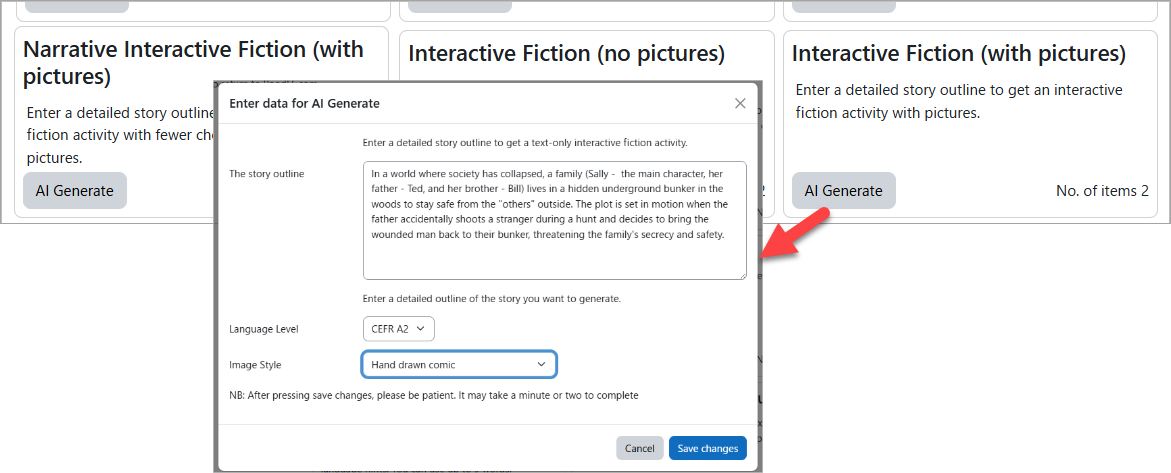
The format ("Yarn") that the stories are written in is powerful but you probably prefer to create the story with the help of AI, and tweak it later. You will see three options for autogenerating fiction items in the AI Generate tab of MiniLesson
Yarn Format 2.0
The story is written in a text format called "Yarn". Read more about Yarn at: https://docs.yarnspinner.dev/beginners-guide
We are using version 2.0. So some of the newer syntax is not available. More detailed specs on version 2.0 are here. A very simple story looks like this.
--------------------------------------------------------
title: Start
---
<<picture 01.png>>
Thom: I wake up in a casino hotel room, feeling disoriented.
Thom: I need to find the contact in the casino to obtain the secret data files.
-> Head to the casino floor
    <<jump CasinoFloor>>
-> Just give up
    <<jump TheEnd>>
===


title: CasinoFloor
---
<<picture 02.png>>
Narrator: The casino is bustling with people, lights, and sounds. I need to stay focused.
-> Take the elevator
    <<jump ElevatorScene>>
-> Just give up
    <<jump TheEnd>>
===


title: ElevatorScene
---
<<picture 03.png>>
Narrator: In the elevator, I encounter a suspicious guest who eyes me closely.
SuspiciousGuest: You look like you're up to something.
-> Give up
    <<jump TheEnd>>
-> Return to the Casino Floor
    <<jump CasinoFloor>>
===


title: TheEnd
---
Narrator: This is the end.
===
Nodes: A story is split into sections called "nodes." You can think of them as scenes. Each node must begin with a title and then three hyphens on a new line. The title should have no spaces and be in ascii characters e.g
title: somescene
---
NB the first node in the story must be titled: "Start"
The end-of-node is three equals signs on a new line. i.e
===
All nodes, including the final one, must have an end-of-node
NB When the end of a node is reached the story ends. So unless the story should end, nodes should jump to another node before they reach the node end.
Dialog usually start with the character's name (with no spaces) a colon and the text. e,g
Jenny: Look what we have here ..
It is possible to omit the character's name and just use text. You might want to do if it is just the narrator. e,g
You are in a dark alley.
To show an avatar image for the character beside their messages, add an image [charactername].jpg (or png) in the item's attachments area. The Fiction item will load and show it if it sees it there.
Commands start with << and end with >>
Jump command is the most common command. It sends the story to the specified node.
<< jump [nodename]>>
Variable commands are used to declare and set variables. Variables must be declared before they are used. And they must be set within a node (ie not at the very top of the Yarn text file)
<<declare $varname = true>>
<<declare $lives = 3>>
<<set $lives = $lives - 1>>
<<set $varname = true>>
You can display the value of variables in dialog output by surrounding the variable name with curly braces {}. e.g
Harry: But I only have {$lives} left!!We added 3 preset variables for showing the user's name: $userfirstname, $userlastname, $userfullname . e.g
Narrator: Welcome {$userfirstname} , your reputation precedes you!We also added a preset variable that indicates whether browser based translation can be performed.
Narrator: Translation available: {$cantranslate}Note that strings should be written using double quotes when used with variables (and everywhere really in Yarn).
<<declare $catsname = "Mog">> Conditionals
The conditional commands are: if else elseif and endif. Use these in combination with variables to track the state of aspects of the story, and branch the narrative accordingly
<<if $lives == 0>>
   <<jump theend>>
<<else>>
   Narrator: That was lucky
<<endif>>
The operators that you can use with conditionals are:
| Equality | == | <<if $points == 1>> |
| Inequality | != | <if $phonetype != 'android'>> |
| Comparison | >, <, >=, <= | <<if $health >= 5>> |
| Logical AND | && | <<if $healthy && $wealthy>> |
| Logical OR | || | <<if $healthy || $wealthy>> |
| Logical NOT | ! | <<if !$rich>> |
Options that the user must choose from start with arrows (a hyphen and a greater than sign): ->
After each option, and at the same level of indentation, set what follows from selecting the option. Often that will be a jump to another node. e.g
-> Give up
   <<jump TheEnd>>
-> Return to the Casino Floor
   <<jump CasinoFloor>>
Hint: You can just use a single option when you want the reader to contribute a line to the conversation (without making any choices)
Options with conditions
If an option is followed by an <<if clause, it will be hidden if the condition is false. If the "show non-options" setting in the fiction item is "yes" then the option will be shown, but disabled, in the case that the condition is false.
Conditions appended to options in this way are different to regular conditions and do not require a closing <endif>>
Japanese_police: You can't enter temple

-> Konnichiwa Onegai Onegai <<if $can_speak_japanese>>
   <<jump temple>>
-> Sorry sir
   <<jump start>>
Pictures / Audio / Video - Poodll MiniLesson adds three custom commands for adding images, audio or video to the story. The media file should be uploaded into the attachments area of the Fiction item settings page. The filename of the media file goes into the custom command, e.g
<<picture 01.png>>
<<audio hungrycat.mp3>>
<<video creepycastle.mp4>>
Translate - Poodll MiniLesson adds another custom command to translate text between the activity target language and the activity native language (or user's preferred native language). This is a beta feature that only works on Google chrome, and on the first run it will prompt the reader to agree to download the translation model. After that the browser has the model for that language pair, and it just works. The download is one time only. After that the browser has it. You will probably use this in conjunction with the cantranslate variable. Because it won't work on Safari / Edge / Firefox (at time of writing)
Bob: Well that escalated quickly!

-> What does that mean? <<if $cantranslate>>
   <<translate "Well that escalated quickly">>
Yarn 3 Features
Some Yarn features from later versions have been implemented ad hoc. These are listed below.
Line Groups (=>)
Line groups allow the engine to automatically pick the "best" line of dialogue to show based on conditions. The student does not see a menu; they only see the single line the engine chooses. If there are conditions, it will choose at random from the lines that satisfy the condition, otherwise it will choose at random from lines with no conditions.
Narrator: The gatekeeper looks at you.
=> Gatekeeper: Welcome back, hero! <<if $score > 10>>
=> Gatekeeper: Why sir, what a surprise! <<if $score > 20>>
=> Gatekeeper: Who are you? Begone!
Once Conditions <<once>>
Once tags are used to ensure a line of dialogue only appears to the student a single time. Or to provide an option that can only be chosen once. For example you might want to give a detailed description the first time a reader enters a room, but a brief introduction on subsequent occasions.
In Options: Place <<once>> at the end of a choice. That choice will not be available to the student again if they choose it.
-> Ask about the secret code <<once>>
    Narrator: The guard tells you the code is 1234.
-> Walk away
   <<jump Start>>
In Line Groups: Place <<once>> at the end of a line. It will be preferred for display over lines with no choices. And it will never be displayed again
=> I have never seen a traveller so wild <<once>>
=> Travellers seem very wild these days.
Without conditions:
<<once>>
   You are in very big beautiful old castle.
<<else>>
   You are back at the castle.
<<endonce>>
With conditions:
<<once if $gold > 10>>
  I HAVE the money.
<<endonce>>
Detours (<<detour>> and <<return>>)
A detour is like a "subroutine." It allows you to jump to another node, play through it, and then automatically return to the exact spot you left off.
Usage:
<<detour NodeName>>The Return: When the detoured node reaches its end (
===) or hits a<<return>>command, the story jumps back to the line immediately following the original detour command.
Guard: Wanna hear my funny joke?

-> Yes. Go ahead.
     <<detour funnyjoke>>
-> No. Not really.

Guard: Anyway, you can't go in
Node Groups
You can give multiple nodes the same title. When you <<jump>> or <<detour>> to that title, the engine will look at all nodes with that name and pick one of those whose conditions are met. Conditions are set by adding the metadata "when" tag to the node header, and setting a when condition. The default condition "always" should be set on one of the nodes in the group.
Though the same flow can be achieved with line groups and if commands, keeping conditions within a node group allows it to be used in a more modular fashion. In the following (admittedly too simple) example the user could be sent to feedback from a hundred different places after they die in your story, with a simple <<jump Feedback>>
title: Feedback
when: $mistakes == 0
---

Teacher: You've mastered this section!
===


title: Feedback
when: always
---

Teacher: Wanna try that again?
===
Smart Variables
These are like mini functions. You can set the value of a smart variable to an expression. The expression is calculated afresh each time the variable is used.
<<declare $bagsize = 4>>
<<declare $itemcount = 0>>
<<declare $bag_is_full = $bagsize == $itemcount>>

<<if $bag_is_full>>
  Stranger: Say, that looks heavy! I happen to have a donkey for sale.
<<else>>
   Stranger: Take one of these free 5kg bricks.
  <<set $itemcount = $itemcount + 1>>
<<endif>>
Functions
Functions can be called in your story to get information back from the system. The four that you can use are:
dice (returns a number from 1 - n) :
<<if 5 < dice(10) >>
  It is your lucky day.
<<endif>>
visited (returns true or false) :
<<if visited('Castle') == false >>
  Perhaps you could visit the King, he always needs company.
<<endif>>
translate (returns the translated text):
This is a beta feature that only works on Google chrome. It uses the activity target language(source) and native languages (destination). The very first time it is called it will prompt the reader to agree to download the translation model. After that the browser has the model for that language pair, and it never needs to be downloaded again (ever ever)
Narrator: It was a very significant event.

-> What does "significant event" mean?
     Narrator: It means: translate("significant event")
-> Whatever that means ..
currentNode (return the name/title of the current node)
Your location is {currentNode()}.

Lazy_Boss: Hurry now. Those leaves won't sweep themselves up!

-> Drop the rake
     <<set $rake_location = currentNode()>>
     <<jump GameArcade>>
Scoring and Grade
By default the fiction item gives a grade of 100% if the story is completed (even if it just exited because the user died). We considered using no grade but after spending 10 minutes battling to get a successful finish it is kind of discouraging to get 0%. So it gives a score by default of 100% on conclusion.
If you declare and set a variable $score the fiction item will notice it and set the grade to that score when the story is completed. Make sure the score ends up between 0 and 100. But fiction will try to limit it to something between those values anyway.
Examine this fiction item to see how scoring is implemented:
https://demo.poodll.com/mod/minilesson/view.php?id=1869
Debugging your Yarn tory
When there is a mistake in the Yarn format the story will crash with a red error message. It can be quite frustrating trying to figure out the error. So below the Yarn fiction text area we added a button "Check Syntax." After editing press the button and it will do a quick check of the story and tell you if it sees a problem. It does not catch everything though. It looks like this:
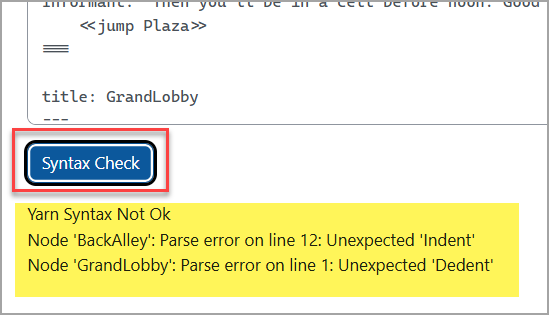
In most cases it will tell you which story node contains the issue. The error message that follows in most cases is not likely to be very helpful, but the common syntax errors are listed below. It will be one of those.
If it is not clear what is wrong, you might need to paste the error AND your yarn story into Chat-GPT / Gemini / DeepSeek and ask it:
"Can you see a reason why this yarn spinner v2.0 formatted interactive story is throwing an error when parsed by bondage.js? "
[paste error]
[paste yarn text]
Common syntax errors:
- The most common error is not starting the story with a node titled "Start" . It must start with "Start"
- Not using lowercase for commands and conditions e.g<<If $score < 0>> is a mistake. It must be <<if $score < 0>>
- Not closing a node with === , this includes the final node.
- Not closing a conditional clause with <<endif>> . Some other tools that use Yarn format forgive this, and AI generated code sometimes omits the <<endif>> .
- Not using ascii no spaces format for titles. title: Get Down and title: 始まり will both fail.
- Incorrect indentation. When options and jumps and character dialog are nested, lines at the same nesting-level should be at the same indentation level. The fiction item text area for the Yarn text uses fixed width fonts so that is easier to see the indentation of each line.
- Using syntax that works in other implementations of Yarn, but not ours. (Yarn v2.0 bondage.js)
e.g <<set $lives += 1>>
+= doesn't work for us, and instead needs to be written as: <<set $lives = $lives + 1>> - Use double quotes when working with strings (not single quotes)
Using AI to generate Yarn stories is definitely helpful, but it will also give you problems like the ones listed above. So be careful. If the story crashes midway usually it will be when you jump to a node that has an error in it. Examine the node carefully. In particular make sure that any variables used have been declared correctly, any node names referenced are correct, and check that <<if>> conditionals are closed properly with <<endif>>. Incorrect indentation is one of the hardest ones to spot. But that can happen too.
We tried to include examples with correct syntax for the above features of Yarn v2.0 in the following fiction item. Check the Yarn code by editing that item:
https://demo.poodll.com/mod/minilesson/view.php?id=1869